Tetrad Manual
  • About
    • πŸ“š Project Background
    • πŸ‘₯ Contributors
    • πŸ“„ Papers and Books
    • πŸ“¬ Questions or Suggestions?
  • Workflows
    • Causal Analysis Workflows
      • 🧭 What You’ll Learn
      • πŸ“Œ Why a Workflow Matters
      • πŸ—ΊοΈ How the Workflow Is Organized
      • 🧠 Practical Advice Before You Begin
      • πŸ™Œ Where to Start
    • Data Exploration: Understanding Your Data Before Causal Discovery
      • 1. Load and Inspect Your Data
      • 2. Review Variable Types
      • 3. Examine Marginal Distributions with Histograms
      • 4. Explore Pairwise Relationships with the Plot Matrix
      • 5. Consider Linearity and Gaussianity (Informally)
      • 6. Reflect on Causal Sufficiency and Latent Variables
      • 7. Clarify Your Modeling Goals
      • 8. Moving Forward
      • Practical Notes
    • Algorithm Selection and Assumptions
      • What This Page Covers
      • 1. Which Assumptions Matter?
        • 1.1. Causal Sufficiency
        • 1.2. Functional Form and Distribution
        • 1.3. Modeling Goal
        • 1.4. Sample Size and Dimensionality
      • 2. Major Algorithm Families in Tetrad
        • 2.1. Constraint-Based Methods
        • 2.2. Score-Based Methods
        • 2.3. Hybrid Methods
        • 2.4 Time Series Data (Lagged Variables)
      • 3. Mapping Assumptions to Starting Choices
      • 4. Choosing Tests and Scores
        • 4.1. Independence Tests
        • 4.2. Scores
      • 5. What If You’re Unsure?
      • 6. Using Grid Search Effectively
      • 7. Summary
      • 🧭 Next Step
    • Manual Exploration: Try Searches Interactively
      • Why Use Manual Exploration?
      • When Manual Exploration Is Useful
      • Pipelines: The Interactive Workflow
      • Building a Simple Pipeline
      • Examples of Manual Exploration
        • A. Varying Test Sensitivity
        • B. Comparing Algorithms
        • C. Adding Background Knowledge
        • D. Exploring Nonlinearity or Non-Gaussianity
      • Inspecting Results
      • How Manual Exploration Leads to Grid Search
      • Tips for Effective Manual Exploration
      • Summary
      • 🧭 Next Step
    • Running Searches and Grid Search Tips
      • Why Use Grid Search?
      • From Single Runs to Systematic Search
      • Running a Basic Search
      • What to Sweep in Grid Search
        • 1. Significance Level (Ξ±) β€” Test-Based Methods
        • 2. Penalty or Discount β€” Score-Based Methods
        • 3. Algorithm Choice
        • 4. Tests and Scores
      • Interpreting Grid Search Results
        • 1. Markov Consistency
        • 2. Model Complexity
      • A Practical Starter Pattern
      • Reading Grid Search Output
      • Common Pitfalls to Avoid
        • Sweeping Too Many Parameters at Once
        • Changing Background Knowledge Too Early
        • Delaying Diagnostics
        • Not Recording What Was Tried
      • Where Grid Search Fits in the Workflow
      • 🧭 Next Step
    • Model Evaluation and Markov Checking
      • Why Model Evaluation Matters
      • What the Markov Checker Does
        • Intuition
      • Running the Markov Checker in Tetrad
      • Interpreting Markov Checker Output
        • Key Outputs
        • How to Read the Results
      • Minimal Markov-Consistent Models
      • Comparing Models from Grid Search
      • Important Caveats
        • Markov Checking Is Not a Proof
        • Test Choice Matters
        • Sampling Variability Exists
      • Beyond Markov Checking
      • Practical Tips
      • Summary
      • 🧭 Next Step
    • Interpreting Results
      • 1. What a Discovered Graph Represents
      • 2. Types of Output and Their Meaning
        • 2.1 Fully Directed Acyclic Graphs (DAGs)
        • 2.2 Completed Partially Directed Acyclic Graphs (CPDAGs)
        • 2.3 Partial Ancestral Graphs (PAGs)
      • 3. Interpreting Common Edge Marks
      • 4. Robustness and Stability
      • 5. What You Can Say (With Care)
      • 6. What You Should Avoid Saying Unqualified
      • 7. Using Background Knowledge
      • 8. Communicating Uncertainty Clearly
      • 9. Documenting Your Analysis
      • 10. Summary
      • 🧭 What’s Next
    • Example: Auto MPG Analysis with Grid Search
      • 1. The Auto MPG Dataset
        • Data Preparation
      • 2. Loading and Exploring the Data in Tetrad
        • Visual Exploration
      • 3. Algorithm Choice and Assumptions
        • Causal Sufficiency
        • Algorithm: BOSS
        • Score: Degenerate Gaussian BIC
      • 4. Setting Up the Grid Search
        • Step 1: Connect the Data
        • Step 2: Algorithms Tab
        • Step 3: Table Columns Tab
        • Step 4: Comparison Tab (Initial Setup)
        • Step 5: Set Parameter Ranges
      • 5. Running the Comparison
      • 6. Interpreting the Comparison Results
        • Choosing a Model
      • 7. Viewing the Selected Graph
      • 8. What This Example Illustrates
      • 9. Next Steps
  • Tetrad Interface
    • Overview
      • Main Window
        • Project tree
        • Work area and tabs
        • Menus and toolbar
        • Status bar, logging pane, and messages
      • Working with Data
        • Importing data
        • Viewing and editing data
        • Linking data and graphs
        • Saving and exporting data
      • Graph Editor
        • Opening and creating graphs
        • Basic editing operations
        • Layout and visualization
        • Background knowledge and tiers
        • Saving and exporting graphs
      • Running Algorithms
        • Launching a search
        • Choosing tests and scores
        • Setting parameters
        • Running and monitoring
        • Re-running with modified settings
      • Estimate model parameters
        • Basic workflow
        • Inspecting the fitted model
        • Relationship to graphs and search
        • Where to look next
      • Viewing and Exporting Results
        • Graph results
        • Tabular and numeric results
        • Exporting graphs and tables
        • Reusing results in pipelines
      • Simulation and Utilities
        • Simulating data on the workbench
        • Resampling and bootstrap workflows
        • Grid Search (overview)
        • Other utilities
    • Box by Box
      • Graph Box
        • Purpose
        • Typical workflow
        • Key controls
        • Common patterns & tips
        • Related pages
      • Compare Box
        • Purpose
        • Typical workflow
        • Types of comparisons
        • Key controls
        • Common patterns & tips
        • Related pages
      • Grid Search Box (Data)
        • Purpose of Data-Based Grid Search
        • When This Mode Is Used
        • Basic Setup
        • Algorithms Tab
        • Table Columns Tab
        • Comparison Tab
        • Interpreting Results
        • View Graphs Tab
        • Notes and Best Practices
        • Summary
      • Grid Search (Simulation)
        • When to Use Simulation-Based Grid Search
        • Key Difference from Data-Based Grid Search
        • Step 1: Select a Simulation
        • Step 2: Algorithms Tab
        • Step 3: Table Columns Tab
        • Step 4: Comparison Tab
        • Step 5: Run Counts and Randomness
        • Running the Comparison
        • Interpreting Simulation Results
        • Common Pitfalls
        • Summary
        • 🧭 Next Steps
      • Parametric Model Box
        • Purpose
        • Typical workflow
        • Key controls
        • Common patterns & tips
        • Related pages
      • Instantiated Model Box
        • Purpose
        • Typical workflow
        • Key controls
        • Common patterns & tips
        • Related pages
      • Estimator Box
        • Purpose
        • Typical workflow
        • Key controls
        • Common patterns & tips
        • Estimator types and detail pages
        • Related pages
      • Data Box
        • Purpose
        • Typical workflow
        • Key controls
        • Common patterns & tips
        • Related pages
      • Simulation Box
        • Purpose
        • Simulation setup
        • Running a simulation
        • Using simulated graphs and data in other boxes
        • Common patterns & tips
        • Related pages
      • Search Box
        • Purpose
        • Wizard workflow
        • Connecting data, knowledge, and outputs
        • Common patterns & tips
        • Related pages
      • Latent Clusters Box
        • Purpose
        • Typical workflow
        • Key controls
        • Common patterns & tips
        • Related pages
      • Latent Structure Box
        • Purpose
        • Wizard workflow
        • Connecting data, clusters, knowledge, and outputs
        • Common patterns & tips
        • Related pages
      • Knowledge Box
        • Purpose
        • Typical workflow
        • Key controls
        • Common patterns & tips
        • Related pages
      • Updater Box
        • Purpose
        • Typical workflow
        • Updater types and detail pages
        • Connecting the Updater with other boxes
        • Common patterns & tips
        • Related pages
      • Regression box
        • Multiple Linear Regression
        • Logistic Regression
        • Adjustment Total Effects
        • IDA Check
        • Interpretation and workflow notes
        • Summary
      • Note Box
        • Purpose
        • Typical workflow
        • Key controls
        • Common patterns & tips
        • Related pages
    • Data Preparation
      • Where data preparation happens in Tetrad
      • Typical data preparation workflow
      • What the rest of this section covers
    • Detail Callouts
      • Data subset / resample
        • Inputs and outputs
        • Variable selection
        • Rows and sampling
        • Typical use cases
      • Detail: Graph Menu (Graph Box)
        • Random Graph
        • Graph Properties
        • Underlinings
        • Paths
        • Highlight
        • Check Graph Type
        • Manipulate Graph
        • PAG Edge Specialization Markups
        • Summary
      • Detail: Display Subgraphs
        • Purpose
        • Basic workflow
        • Subgraph types
        • Summary
      • Detail: Markov Checker
        • Purpose
        • Basic workflow
        • Outputs
        • Interpreting results
      • Detail: Bootstrapping and Ensemble Graphs
        • What Bootstrapping Does
        • Enabling Bootstrapping
        • Running a Bootstrapped Search
        • The Edges Tab: Bootstrap Frequencies
        • Ensemble Graph Display Options
        • How to Use Bootstrapping Effectively
        • Important Caveats
        • Summary
      • Detail: Parametric & Instantiated Model Types
        • Model families
        • Interaction with Estimator and Simulation
      • Detail: Simulation types
        • Bayes net
        • Linear structural equation model
        • Linear Fisher model
        • Nonlinear additive SEM (CAM)
        • General noise SEM
        • Additive noise SEM
        • Lee and Hastie
        • Conditional Gaussian
        • Time series
        • Choosing a simulator
      • Detail: Bayes (Multinomial) Parametric Model
        • When to use Bayes models
        • Main panel layout
        • Typical workflow
        • Tips and caveats
      • Detail: Bayes (Multinomial) Instantiated Model
        • How Bayes instantiated models are created
        • Instantiated Model box layout (Bayes)
        • Typical uses
        • Tips
      • Detail: ML Bayes Estimator
        • Purpose
        • Inputs and requirements
        • How it works (conceptually)
        • Output
        • Tips and common issues
        • Related pages
      • Detail: Dirichlet Estimator
        • Purpose
        • Inputs and requirements
        • How it works (conceptually)
        • Output
        • Tips and common issues
        • Related pages
      • Detail: EM Bayes Estimator
        • Purpose
        • Inputs and requirements
        • How it works (conceptually)
        • Output
        • Tips and common issues
        • Related pages
      • Detail: SEM (Linear) Parametric Model
        • When to use SEM models
        • Main panel layout
        • Typical workflow
        • Tips and caveats
      • Detail: SEM (Linear) Instantiated Model
        • How SEM instantiated models are created
        • Instantiated Model box layout (SEM)
        • File menu options (SEM instantiated model)
      • Detail: SEM (Linear) Estimator
        • Purpose
        • Inputs and requirements
        • How it works (conceptually)
        • Output
        • File menu options (SEM Estimator)
      • Detail: Hybrid (Conditional Gaussian) Parametric Model
        • When to use Hybrid models
        • Main panel layout
        • Typical workflow
        • Tips and caveats
      • Detail: Hybrid (Conditional Gaussian) Instantiated Model
        • How Hybrid instantiated models are created
        • Instantiated Model box layout (Hybrid)
        • Typical uses
        • Tips
      • Detail: Hybrid CG Estimator
        • Purpose
        • Inputs and requirements
        • How it works (conceptually)
        • Output
        • Tips and common issues
        • Related pages
      • Detail: Generalized Parametric Model
        • When to use Generalized models
        • Main panel layout
        • Typical workflow
        • Tips and caveats
      • Detail: Generalized Instantiated Model
        • How Generalized instantiated models are created
        • Instantiated Model box layout (Generalized)
        • Typical uses
        • Tips
      • Detail: Generalized SEM Estimator
        • Purpose
        • Inputs and requirements
        • How it works (conceptually)
        • Output
        • Tips and common issues
        • Related pages
      • Detail: Junction Tree Updater
        • Purpose
        • Inputs and setup
        • How it works (conceptually)
        • Output
        • Tips
        • Related pages
      • Detail: Approximate Updater
        • Purpose
        • Inputs and setup
        • How it works (conceptually)
        • Output
        • Tips
        • Related pages
      • Detail: Row Summing Updater
        • Purpose
        • Inputs and setup
        • How it works (conceptually)
        • Output
        • Tips
        • Related pages
      • Detail: SEM Updater
        • Purpose
        • Inputs and setup
        • How it works (conceptually)
        • Output
        • Tips
        • Related pages
      • Detail: Adjustment and Total Effects: Amenability and Discrete Variables
        • What Is an Amenable Pair?
        • Amenability via Visible Edges
        • How Amenability Is Reported in the Tool
        • Discrete Variables and Regression Output
        • Amenability and Refining Equivalence Classes
        • Summary
      • Detail: IDA Check (Regression box)
        • Layout and controls
        • Table columns
        • Summary statistics (bottom)
        • Typical usage
        • Notes and references
      • Detail: N-tad Explorer
        • Basic workflow
        • Interpretation
        • Tips and notes
        • Using N-tad Explorer with SEMs
  • Python and R Bindings
    • py-tetrad (Python Binding)
    • rpy-tetrad (R Binding)
    • When to Use These Bindings
    • Related Python Ecosystem Tools
      • Relationship to Tetrad
      • Recommendation
  • Graphs and DataSets
    • Graph Types and Formats
      • 1. Core Graph Types in Tetrad
        • 1.1 DAG β€” Directed Acyclic Graph
        • 1.2 CPDAG β€” Completed Partially Directed Acyclic Graph
        • 1.3 MAG β€” Maximal Ancestral Graph
        • 1.4 PAG β€” Partial Ancestral Graph
      • 2. Endpoint Marking System
      • 3. PAG Edge-Specialization Markup (Optional GUI Feature)
        • 3.1 Two Independent Attributes
        • (A) Visibility
        • (B) Directness
        • 3.2 The Four Directed-Edge Types
        • 3.3 Undirected Edges Represent Selection Bias
      • 4. Saving and Loading Graphs
        • 4.1 Conceptual Plain-Text Format
      • 5. Graphs and Data: Name Matching
      • 6. Summary
    • Data Types and Formats
      • 1. Overview of Supported Formats
      • 2. Dataset Format (Tabular Data)
        • Notes
      • 3. Discrete Data
      • 4. Continuous Data
      • 5. Covariance and Correlation Matrices
        • 5.1 Required Structure
        • 5.2 Lower Triangle Covariance Matrix Example
        • 5.3 Full Square Covariance Matrix Example (Current Default)
        • 5.4 Correlation Matrices
        • 5.5 Common Parsing Errors for Covariance/Correlation Files
      • 6. Lower-Triangular Format
        • 6.1 Note on GUI Display
      • 7. Exporting Data from Tetrad
      • 8. Summary
  • Search Algorithms
    • Choosing an Algorithm
      • πŸ” Choosing an Algorithm
      • 🧭 Recommended Algorithms (At a Glance)
      • πŸ” DAG / CPDAG Methods (No Latent Confounders)
      • πŸŒ€ PAG Methods (Hidden Confounders Allowed)
      • πŸ”§ Other Useful Algorithm Classes
      • πŸŽ› Choosing CI Tests & Scores (Quick Guide)
      • ⚠️ Common Pitfalls and Fixes
    • Search Algorithms β€” By Type
      • Legend β€” Algorithm Categories
        • Extra Structural Badges
      • πŸ” Constraint-Based Algorithms (CPDAG / PAG)
      • πŸ“ Score-Based Algorithms (CPDAG)
      • πŸŒ€ Hybrid Algorithms (Score + FCI)
      • 🎨 Non-Gaussian, Moment-Based, and Orientation Algorithms
      • Nonlinear & Distribution-Shift Algorithms
      • πŸ“¦ Stability / Resampling / Ensemble Wrappers
      • πŸ§ͺ Specialized / Utility Algorithms
      • Latent Clustering (Measurement Block Discovery)
      • Latent Structure / Measurement-Model Construction
    • Search Algorithms β€” Alphabetical
      • 1. BOSS β€” Best Order Score Search
        • 1.1. Key idea
        • 1.2. When to use
        • 1.3. How it works (at a glance)
        • 1.4. Strengths
        • 1.5. Limitations
        • 1.6. How it relates to other Tetrad algorithms
        • 1.7. Prior knowledge support
        • 1.8. Parameters
        • 1.9. Reference
        • 1.10. Summary
      • 2. BOSS-FCI β€” Best-Order Score Search + FCI Refinement
        • 2.1. Key Idea
        • 2.2. When to Use
        • 2.3. Strengths
        • 2.4. Limitations
        • 2.5. How It Differs From Related Algorithms
        • 2.6. Prior Knowledge Support
        • 2.7. Key Parameters in Tetrad
        • 2.8. Reference
        • 2.9. Summary
      • 3. BPC β€” Build Pure Clusters
        • 3.1. Basic Assumptions
        • 3.2. High-Level Algorithm
        • 3.3. Output and Interpretation
        • 3.4. Parameters in Tetrad
        • 3.5. Strengths
        • 3.6. Limitations
        • 3.7. Reference
        • 3.8. Summary
      • 4. CAM β€” Causal Additive Model
        • 4.1. Key Idea
        • 4.2. When to Use CAM
        • 4.3. Prior Knowledge Support
        • 4.4. Strengths
        • 4.5. Limitations
        • 4.6. Key Parameters in Tetrad
        • 4.7. Reference
        • 4.8. Summary
      • 5. CCD β€” Cyclic Causal Discovery
        • 5.1. Key Idea
        • 5.2. When to Use
        • 5.3. Prior Knowledge Support
        • 5.4. Strengths
        • 5.5. Limitations
        • 5.6. Key Parameters in Tetrad
        • 5.7. Reference
        • 5.8. Summary
      • 6. CD-NOD β€” Causal Discovery from Nonstationary / Distribution-Shifted Data
        • 6.1. Key Idea
        • 6.2. When to Use
        • 6.3. Prior Knowledge Support
        • 6.4. Strengths
        • 6.5. Limitations
        • 6.6. Key Parameters in Tetrad / Scripting
        • 6.7. Reference
        • 6.8. Summary
      • 7. Conservative PC (CPC) β€” Conservative Collider Orientation
        • 7.1. Key Idea
        • 7.2. When to Use
        • 7.3. Prior Knowledge Support
        • 7.4. Strengths
        • 7.5. Limitations
        • 7.6. Key Parameters in Tetrad
        • 7.7. Reference
        • 7.8. Summary
      • 8. CStaR (Causal Stability Ranking)
        • 8.1. High-level idea
        • 8.2. Inputs
        • 8.3. Outputs
        • 8.4. Parameters
        • 8.5. When to use CStaR
        • 8.6. References
        • 8.7. Summary
      • 9. DAGMA β€” Learning DAGs via M-Matrices and Log-Determinant Acyclicity
        • 9.1. Key Idea
        • 9.2. When to Use
        • 9.3. Prior Knowledge Support
        • 9.4. Strengths
        • 9.5. Limitations
        • 9.6. Key Parameters in Tetrad
        • 9.7. Reference
        • 9.8. Summary
      • 10. DirectLiNGAM
        • 10.1. Key Idea
        • 10.2. When to Use
        • 10.3. Prior Knowledge Support
        • 10.4. Strengths
        • 10.5. Limitations
        • 10.6. Key Parameters in Tetrad
        • 10.7. Reference
        • 10.8. Summary
      • 11. DM (Detect–Mimic)
        • 11.1. DM-PC
        • 11.2. DM-FCIT
      • 12. Factor Analysis
        • 12.1. Purpose
        • 12.2. When to Use
        • 12.3. How It Works (Conceptual)
        • 12.4. Strengths
        • 12.5. Limitations
        • 12.6. Relation to Other Latent Tools
        • 12.7. References
        • 12.8. Summary
      • 13. FAS β€” Fast Adjacency Search
        • 13.1. Key Idea
        • 13.2. When to Use
        • 13.3. Case Study: High-dimensional fMRI Preprocessing
        • 13.4. Prior Knowledge Support
        • 13.5. Strengths
        • 13.6. Limitations
        • 13.7. Key Parameters in Tetrad
        • 13.8. Reference
        • 13.9. Summary
      • 14. FASK β€” Fast Adjacency Skewness
        • 14.1. Key Idea
        • 14.2. When to Use
        • 14.3. Prior Knowledge Support
        • 14.4. Strengths
        • 14.5. Limitations
        • 14.6. Key Parameters in Tetrad
        • 14.7. Reference
        • 14.8. Summary
      • 15. FASK-Vote β€” Multi-Dataset FASK Voting over IMaGES
        • 15.1. Key Idea
        • 15.2. When to Use
        • 15.3. Prior Knowledge Support
        • 15.4. Strengths
        • 15.5. Limitations
        • 15.6. ImagES Parameters
        • 15.7. FASK Parameters
        • 15.8. Reference
        • 15.9. Summary
      • 16. FCI β€” Fast Causal Inference
        • 16.1. Key idea
        • 16.2. When to use FCI
        • 16.3. Assumptions
        • 16.4. How it works (at a glance)
        • 16.5. How it relates to other Tetrad algorithms
        • 16.6. Strengths
        • 16.7. Limitations
        • 16.8. Prior knowledge
        • 16.9. Key parameters in Tetrad
        • 16.10. References
      • 17. FCI-IOD β€” FCI with Independent Overlapping Datasets
        • 17.1. Key Idea
        • 17.2. When to Use
        • 17.3. Prior Knowledge Support
        • 17.4. Strengths
        • 17.5. Limitations
        • 17.6. Key Parameters in Tetrad
        • 17.7. Reference
        • 17.8. Summary
      • 18. FCIT β€” FCI with Targeted Testing
        • 18.1. Key Idea
        • 18.2. When to Use
        • 18.3. Strengths
        • 18.4. Limitations
        • 18.5. How It Differs From Related Algorithms
        • 18.6. Prior Knowledge Support
        • 18.7. Key Parameters in Tetrad
        • 18.8. Reference
        • 18.9. Summary
      • 19. FGES β€” Fast Greedy Equivalence Search
        • 19.1. Key Idea
        • 19.2. A Nuanced View of Scalability and Sparsity
        • 19.3. When to Use FGES
        • 19.4. Prior Knowledge Support
        • 19.5. Strengths
        • 19.6. Limitations
        • 19.7. Key Parameters in Tetrad
        • 19.8. Reference
        • 19.9. Summary
      • 20. FGES-MB β€” FGES Markov Blanket Search
        • 20.1. Key idea
        • 20.2. When to use FgesMb
        • 20.3. Prior knowledge support
        • 20.4. Strengths
        • 20.5. Limitations
        • 20.6. Key parameters in Tetrad
        • 20.7. Reference
        • 20.8. Summary
      • 21. FOFC β€” Find One-Factor Clusters
        • 21.1. Key Idea
        • 21.2. When to Use
        • 21.3. Prior Knowledge Support
        • 21.4. Strengths
        • 21.5. Limitations
        • 21.6. Key Parameters in Tetrad
        • 21.7. Reference
        • 21.8. Summary
      • 22. FTFC β€” Find Two-Factor Clusters (Sextad-Based)
        • 22.1. Key Idea
        • 22.2. Relation to FOFC and GFFC
        • 22.3. When to Use FTFC
        • 22.4. Strengths
        • 22.5. Limitations
        • 22.6. Parameters in Tetrad
        • 22.7. Reference
        • 22.8. Summary
      • 23. GFCI β€” Greedy Fast Causal Inference
        • 23.1. πŸ” Key Idea
        • 23.2. 🎯 When to Use GFCI
        • 23.3. 🧠 Prior Knowledge
        • 23.4. ⭐ Strengths
        • 23.5. ⚠️ Limitations
        • 23.6. πŸ”§ Key Parameters (Tetrad)
        • 23.7. β›“ Relation to Other Algorithms
        • 23.8. πŸ“š Reference
      • 24. GFFC β€” Generalized Find Factor Clusters
        • 24.1. Key Idea
        • 24.2. Algorithm Overview
        • 24.3. Why Use GFFC?
        • 24.4. Strengths
        • 24.5. Limitations
        • 24.6. Parameters in Tetrad
        • 24.7. Reference
        • 24.8. Summary
      • 25. GIN (Generalized Independent Noise)
        • 25.1. Overview
        • 25.2. Requirements
        • 25.3. Parameters
        • 25.4. How the Algorithm Works
        • 25.5. Output
        • 25.6. When to Use
        • 25.7. When Not to Use
        • 25.8. Notes
        • 25.9. References
      • 26. GRaSP β€” Greedy Relaxations of the Sparsest Permutation
        • 26.1. Key idea
        • 26.2. When to use
        • 26.3. How it works (at a glance)
        • 26.4. Strengths
        • 26.5. Limitations
        • 26.6. How it relates to other Tetrad algorithms
        • 26.7. Prior knowledge support
        • 26.8. Key parameters in Tetrad
        • 26.9. Reference
        • 26.10. Summary
      • 27. GRaSP-FCI β€” Greedy Relaxations of Sparsest Permutation + FCI Refinement
        • 27.1. Key Idea
        • 27.2. When to Use
        • 27.3. Strengths
        • 27.4. Limitations
        • 27.5. How It Differs From Related Algorithms
        • 27.6. Prior Knowledge Support
        • 27.7. Key Parameters in Tetrad
        • 27.8. Reference
        • 27.9. Summary
      • 28. ICA Lingam β€” ICA-Based LiNGAM
        • 28.1. Key Idea
        • 28.2. When to Use
        • 28.3. Prior Knowledge Support
        • 28.4. Strengths
        • 28.5. Limitations
        • 28.6. Key Parameters in Tetrad
        • 28.7. Reference
        • 28.8. Summary
      • 29. ICA LingD β€” Cyclic LiNGAM (Lacerda et al.)
        • 29.1. Key Idea
        • 29.2. When to Use
        • 29.3. Prior Knowledge Support
        • 29.4. Strengths
        • 29.5. Limitations
        • 29.6. Key Parameters in Tetrad
        • 29.7. Reference
        • 29.8. Summary
      • 30. IMaGES β€” Independent Multiple-sample Greedy Equivalence Search
        • 30.1. Key Idea
        • 30.2. Variants
        • 30.3. When to Use
        • 30.4. Prior Knowledge Support
        • 30.5. Strengths
        • 30.6. Limitations
        • 30.7. Key Parameters in Tetrad
        • 30.8. Reference
        • 30.9. Summary
      • 31. Latent Clusters
        • 31.1. Key Idea
        • 31.2. When to Use
        • 31.3. Prior Knowledge Support
        • 31.4. Strengths
        • 31.5. Limitations
        • 31.6. Latent Cluster Algorithms in Tetrad
        • 31.7. Relationship to Latent Structure Algorithms
        • 31.8. Summary
      • 32. LV-Heuristic β€” Heuristic Latent-Variable PAG from a Single DAG
        • 32.1. What LV-Heuristic Is (and Is Not)
        • 32.2. Key Idea
        • 32.3. When to Use LV-Heuristic
        • 32.4. Strengths
        • 32.5. Limitations
        • 32.6. How LV-Heuristic Differs From Other Mixed-Strategy Algorithms
        • 32.7. Prior Knowledge Support
        • 32.8. Key Parameters in Tetrad
        • 32.9. Reference
        • 32.10. Summary
      • 33. Mimbuild Bollen
        • 33.1. Purpose
        • 33.2. How It Works (Conceptual)
        • 33.3. Strengths
        • 33.4. Limitations
        • 33.5. Relation to Other Latent Tools
        • 33.6. References
        • 33.7. Summary
      • 34. Mimbuild PCA
        • 34.1. Purpose
        • 34.2. How It Works (Conceptual)
        • 34.3. Strengths
        • 34.4. Limitations
        • 34.5. Relation to Other Latent Tools
        • 34.6. References
        • 34.7. Summary
      • 35. PagSamplingRfci
        • 35.1. Key Idea
        • 35.2. When to Use
        • 35.3. Prior Knowledge Support
        • 35.4. Strengths
        • 35.5. Limitations
        • 35.6. Key Parameters in Tetrad
        • 35.7. Reference
        • 35.8. Summary
      • 36. Pairwise Orientation Methods β€” FaskPw & RSkew
        • 36.1. Overview
        • 36.2. FaskPw β€” FASK Pairwise Left–Right Orientation
        • 36.3. Key Idea
        • 36.4. When to Use
        • 36.5. Strengths
        • 36.6. Limitations
        • 36.7. Parameters in Tetrad
        • 36.8. RSkew β€” Robust Skewness Orientation (HyvΓ€rinen & Smith, 2013)
        • 36.9. Key Idea (informal)
        • 36.10. When to Use
        • 36.11. Strengths
        • 36.12. Limitations
        • 36.13. Parameters in Tetrad
        • 36.14. Prior Knowledge Support
        • 36.15. Summary
      • 37. PC β€” Peter–Clark Algorithm
        • 37.1. Key Idea
        • 37.2. When to Use
        • 37.3. Prior Knowledge Support
        • 37.4. Strengths
        • 37.5. Limitations
        • 37.6. Key Parameters in Tetrad
        • 37.7. Historical Notes
        • 37.8. Additional Reference
        • 37.9. Summary
      • 38. PC-Max β€” PC with Maximum-p Collider Orientation
        • 38.1. Key Idea
        • 38.2. When to Use
        • 38.3. Relation to Standard PC
        • 38.4. Prior Knowledge Support
        • 38.5. Strengths
        • 38.6. Limitations
        • 38.7. Key Parameters in Tetrad
        • 38.8. Reference
        • 38.9. Summary
      • 39. PCD β€” PC for Deterministic Relations
        • 39.1. Key Idea
        • 39.2. When to Use
        • 39.3. Prior Knowledge Support
        • 39.4. Strengths
        • 39.5. Limitations
        • 39.6. Key Parameters in Tetrad
        • 39.7. Summary
      • 40. PC-MB β€” PC Markov Blanket Search
        • 40.1. Key Idea
        • 40.2. When to Use
        • 40.3. Prior Knowledge Support
        • 40.4. Strengths
        • 40.5. Limitations
        • 40.6. Key Parameters in Tetrad
        • 40.7. Reference
        • 40.8. Summary
      • 41. PCMCI β€” Time-Series Causal Discovery (Runge et al.)
        • 41.1. Key Idea
        • 41.2. When to Use
        • 41.3. Prior Knowledge Support
        • 41.4. Strengths
        • 41.5. Limitations
        • 41.6. Key Parameters in Tetrad
        • 41.7. Reference
        • 41.8. Summary
      • 42. Restricted BOSS β€” Target-Focused Best Order Score Search
        • 42.1. Key Idea
        • 42.2. When to Use
        • 42.3. Prior Knowledge Support
        • 42.4. Strengths
        • 42.5. Limitations
        • 42.6. Key Parameters in Tetrad
        • 42.7. Reference
        • 42.8. Summary
      • 43. RFCI β€” Really Fast Causal Inference
        • 43.1. Key Idea
        • 43.2. When to Use
        • 43.3. Prior Knowledge Support
        • 43.4. Strengths
        • 43.5. Limitations
        • 43.6. Key Parameters in Tetrad
        • 43.7. Reference
        • 43.8. Summary
      • 44. RFCI-BSC
        • 44.1. Key Idea
        • 44.2. When to Use
        • 44.3. Prior Knowledge Support
        • 44.4. Strengths
        • 44.5. Limitations
        • 44.6. Key Parameters in Tetrad
        • 44.7. Reference
        • 44.8. Summary
      • 45. SingleGraphAlg (Imported Graph Wrapper)
        • 45.1. What it does
        • 45.2. Typical workflow
        • 45.3. When to use (and when not to)
      • 46. SP β€” Sparsest Permutation
        • 46.1. Key idea
        • 46.2. When to use
        • 46.3. How it works (at a glance)
        • 46.4. Strengths
        • 46.5. Limitations
        • 46.6. How it relates to other Tetrad algorithms
        • 46.7. Prior knowledge support
        • 46.8. Reference
        • 46.9. Summary
      • 47. SP-FCI β€” Sparsest-Permutation FCI
        • 47.1. Key Idea
        • 47.2. When to Use
        • 47.3. Strengths
        • 47.4. Limitations
        • 47.5. Key Parameters in Tetrad
        • 47.6. Knowledge Support
        • 47.7. Relation to Other Algorithms
        • 47.8. References
        • 47.9. Summary
      • 48. StabilitySelection
        • 48.1. Key Idea
        • 48.2. When to Use
        • 48.3. Prior Knowledge Support
        • 48.4. Strengths
        • 48.5. Limitations
        • 48.6. Key Parameters in Tetrad
        • 48.7. Reference
        • 48.8. Summary
      • 49. StARS
        • 49.1. Key Idea
        • 49.2. When to Use
        • 49.3. Prior Knowledge Support
        • 49.4. Strengths
        • 49.5. Limitations
        • 49.6. Key Parameters in Tetrad
        • 49.7. Reference
        • 49.8. Summary
      • 50. TSC β€” Trek Separation Clusters
        • 50.1. Intended use
        • 50.2. Model assumptions (NOLAC version)
        • 50.3. High-level algorithm sketch
        • 50.4. Inputs and outputs
        • 50.5. Key parameters
        • 50.6. Practical guidance
        • 50.7. Limitations
        • 50.8. Related methods
        • 50.9. Summary
  • Tests & Scores
    • Choosing Tests & Scores
      • 1. Continuous, Approximately Gaussian Data
        • Recommended Tests
        • Recommended Scores
        • Best-Fit Algorithms
      • 2. Discrete Data (Binary / Ordinal / Categorical)
        • Recommended Tests
        • Recommended Scores
        • Best-Fit Algorithms
      • 3. Mixed Continuous/Discrete Data
        • A. Conditional Gaussian (CG)
        • B. Degenerate Gaussian (DGC)
        • C. Basis Function (BF) Tests/Scores
      • 4. Non-Gaussian Linear Models
        • Recommended Tests
        • Recommended Scores
        • Best-Fit Algorithms
      • 5. Nonlinear Models
        • A. Kernel Conditional Independence Test (KCI)
        • B. Random Conditional Independence Test (RCIT)
        • B. Basis Function Test / Score (Recommended for scalability)
      • 6. Latent Variable Workflows (Block-Based Search)
        • Block-Based Tests/Scores
        • Compatible Algorithms
        • Typical Workflow
      • Summary Table (Practical Defaults)
      • Next Steps
    • Tests and Scores: By Type
      • Independence Tests
        • Independence Tests Overview
      • Scores
        • Scores Overview
      • How Tests and Scores Are Used in Algorithms
    • Tests and Scores β€” Alphabetical
      • 1. Basis Function BIC Score
        • 1.1. Summary
        • 1.2. When to use
        • 1.3. Model class
        • 1.4. Score form (conceptual)
        • 1.5. Parameters
        • 1.6. Strengths
        • 1.7. Limitations
        • 1.8. References
      • 2. Basis Function Likelihood Ratio Test
        • 2.1. Summary
        • 2.2. When to use
        • 2.3. Assumptions
        • 2.4. Test details (conceptual)
        • 2.5. Parameters
        • 2.6. Strengths
        • 2.7. Limitations
        • 2.8. References
      • 3. BDeu Score
        • 3.1. Summary
        • 3.2. When to use
        • 3.3. Model class
        • 3.4. Score form (conceptual)
        • 3.5. Parameters
        • 3.6. Strengths
        • 3.7. Limitations
        • 3.8. References
      • 4. Chi-Square Test
        • 4.1. Summary
        • 4.2. When to use
        • 4.3. Assumptions
        • 4.4. Test details (conceptual)
        • 4.5. Parameters
        • 4.6. Strengths
        • 4.7. Limitations
        • 4.8. References
      • 5. Conditional Gaussian BIC Score
        • 5.1. Summary
        • 5.2. When to use
        • 5.3. Model class
        • 5.4. Score form (conceptual)
        • 5.5. Parameters
        • 5.6. Strengths
        • 5.7. Limitations
        • 5.8. References
      • 6. Conditional Gaussian Likelihood Ratio Test
        • 6.1. Summary
        • 6.2. When to use
        • 6.3. Assumptions
        • 6.4. Test details (conceptual)
        • 6.5. Parameters
        • 6.6. Strengths
        • 6.7. Limitations
        • 6.8. References
        • 6.9. References
      • 7. Degenerate Gaussian BIC Score
        • 7.1. Summary
        • 7.2. When to use
        • 7.3. Model class
        • 7.4. Score form (conceptual)
        • 7.5. Parameters
        • 7.6. Strengths
        • 7.7. Limitations
        • 7.8. References
      • 8. Degenerate Gaussian Likelihood Ratio Test
        • 8.1. Summary
        • 8.2. When to use
        • 8.3. Assumptions
        • 8.4. Test details (conceptual)
        • 8.5. Parameters
        • 8.6. Strengths
        • 8.7. Limitations
        • 8.8. References
      • 9. Discrete BIC Score
        • 9.1. Summary
        • 9.2. When to use
        • 9.3. Model class
        • 9.4. Score form (conceptual)
        • 9.5. Parameters
        • 9.6. Strengths
        • 9.7. Limitations
      • 10. Extended BIC (EBIC) Score
        • 10.1. Summary
        • 10.2. When to use
        • 10.3. Model class
        • 10.4. Score form (conceptual)
        • 10.5. Parameters
        • 10.6. Strengths
        • 10.7. Limitations
        • 10.8. References
      • 11. Fisher Z Test
        • 11.1. Summary
        • 11.2. When to use
        • 11.3. Assumptions
        • 11.4. Test details (conceptual)
        • 11.5. Parameters
        • 11.6. Strengths
        • 11.7. Limitations
        • 11.8. References
      • 12. G-Square Test
        • 12.1. Summary
        • 12.2. When to use
        • 12.3. Assumptions
        • 12.4. Test details (conceptual)
        • 12.5. Parameters
        • 12.6. Strengths
        • 12.7. Limitations
        • 12.8. References
      • 13. Generalized Information Criterion (GIC) Scores
        • 13.1. Summary
        • 13.2. When to use
        • 13.3. Model class
        • 13.4. Score form (conceptual)
        • 13.5. Parameters
        • 13.6. Strengths
        • 13.7. Limitations
        • 13.8. References
      • 14. Kernel Conditional Independence Test (KCI)
        • 14.1. Summary
        • 14.2. When to use
        • 14.3. Assumptions
        • 14.4. Test details (conceptual)
        • 14.5. Parameters
        • 14.6. Strengths
        • 14.7. Limitations
        • 14.8. References
      • 15. m-Separation Test
        • 15.1. Summary
        • 15.2. When to use
        • 15.3. Assumptions
        • 15.4. Test details (conceptual)
        • 15.5. Parameters in Tetrad
        • 15.6. Strengths
        • 15.7. Limitations
        • 15.8. References
      • 16. m-Separation Score
        • 16.1. Summary
        • 16.2. When to use
        • 16.3. Model class
        • 16.4. Score form (conceptual)
        • 16.5. Parameters in Tetrad
        • 16.6. Strengths
        • 16.7. Limitations
      • 17. MVP BIC Score
        • 17.1. Summary
        • 17.2. When to use
        • 17.3. Model class
        • 17.4. Score form (conceptual)
        • 17.5. Parameters
        • 17.6. Strengths
        • 17.7. Limitations
      • 18. Multivariate Polynomial Likelihood Ratio Test (MVPLRT)
        • 18.1. Summary
        • 18.2. When to use
        • 18.3. Assumptions
        • 18.4. Test details (conceptual)
        • 18.5. Parameters
        • 18.6. Strengths
        • 18.7. Limitations
      • 19. Poisson BIC Test
        • 19.1. Summary
        • 19.2. When to use
        • 19.3. Relation to Poisson Prior Score
        • 19.4. Test details (conceptual)
        • 19.5. Parameters
        • 19.6. Strengths
        • 19.7. Limitations
      • 20. Poisson Prior Score
        • 20.1. Summary
        • 20.2. When to use
        • 20.3. Model class
        • 20.4. Score form (conceptual)
        • 20.5. Parameters
        • 20.6. Strengths
        • 20.7. Limitations
        • 20.8. Relation to other penalties
      • 21. Probabilistic Independence Test
        • 21.1. Summary
        • 21.2. When to use
        • 21.3. Assumptions
        • 21.4. Test details (conceptual)
        • 21.5. Parameters
        • 21.6. Strengths
        • 21.7. Limitations
      • 22. Random Conditional Independence Test (RCIT)
        • 22.1. Summary
        • 22.2. When to use
        • 22.3. Assumptions
        • 22.4. Test details (conceptual)
        • 22.5. Parameters
        • 22.6. Strengths
        • 22.7. Limitations
        • 22.8. Relationship to other CI tests in Tetrad
        • 22.9. References
      • 23. SEM BIC Score
        • 23.1. Summary
        • 23.2. When to use
        • 23.3. Model class
        • 23.4. Score form (conceptual)
        • 23.5. Parameters
        • 23.6. Strengths
        • 23.7. Limitations
      • 24. SEM BIC Test
        • 24.1. Summary
        • 24.2. When to use
        • 24.3. Relation to SEM BIC Score
        • 24.4. Test details (conceptual)
        • 24.5. Strengths
        • 24.6. Limitations
      • 25. Zhang–Shen Bound Score
        • 25.1. Summary
        • 25.2. When to use
        • 25.3. Model class
        • 25.4. Score form (conceptual)
        • 25.5. Parameters
        • 25.6. Strengths
        • 25.7. Limitations
        • 25.8. References
  • Parameters
  • Contributors
    • 🌟 Founders & Early Leadership
    • 🧭 Project Direction & Architecture
    • πŸ”¬ Algorithmic & Research Contributions
    • πŸ›  Software Engineering & Infrastructure
    • πŸ› Funding Acknowledgment
  • Papers and Books
  • Change Log
Tetrad Manual
  • Workflows
  • Example: Auto MPG Analysis with Grid Search
  • View page source

Example: Auto MPG Analysis with Grid Search

This page walks through a complete causal analysis workflow in Tetrad using the Auto MPG dataset.
It illustrates how to move from data exploration to model selection using Grid Search and Markov checking, following the default workflow recommended in this manual.

The goal is not to identify a single β€œtrue” causal graph, but to show how to arrive at a minimal, Markov-consistent model under clearly stated assumptions.


1. The Auto MPG Dataset

We use the Auto MPG dataset from the CMU causal datasets repository:

  • Repository:
    https://github.com/cmu-phil/example-causal-datasets

  • Data file used:

    real/auto-mpg/data/auto-mpg.data.mixed.max.3.categories.txt

Data Preparation

Before loading the data into Tetrad, we made two simple preprocessing decisions:

  1. Removed the car name field, which serves as an identifier and is not meaningful for causal modeling.

  2. Removed rows with missing values, to keep the example focused on the core workflow rather than missing-data handling.

The resulting dataset contains:

  • Several continuous variables (e.g., mpg, weight, horsepower)

  • One discrete variable (origin) with three categories

Because of this mixture, the data should be loaded as mixed data with a maximum of 3 categories, as indicated in the file name.


2. Loading and Exploring the Data in Tetrad

  1. Load the dataset into a Data box.

  2. Specify that the data are mixed, with a maximum of 3 categories.

Visual Exploration

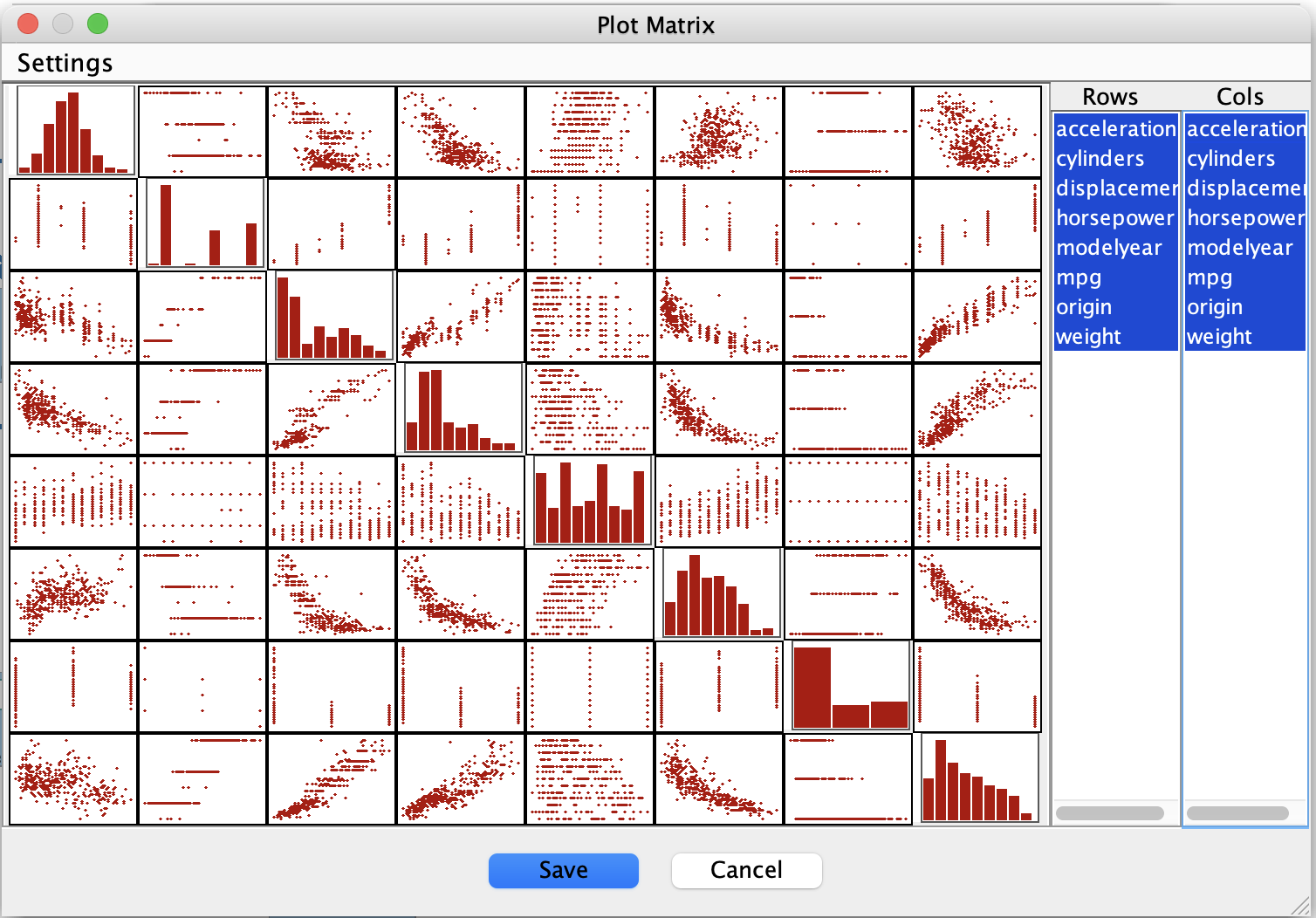
Plot matrix for the Auto MPG data.

Using the Plot Matrix tool in the Data box, we observe:

  • Strong, approximately linear relationships among many pairs of variables

  • No obvious nonlinear clusters or sharp discontinuities

  • Patterns consistent with additive, roughly Gaussian noise

These observations suggest that linear-Gaussian modeling assumptions are reasonable for this dataset, even though one variable is discrete.


3. Algorithm Choice and Assumptions

Causal Sufficiency

For this example, we assume causal sufficiency:

  • All major common causes of the measured variables are assumed to be observed.

  • We therefore search for a CPDAG (a Markov equivalence class of DAGs), rather than a PAG.

This is a modeling assumption made for illustration purposes; it simplifies the workflow and is reasonable for this dataset.


Algorithm: BOSS

We choose BOSS, a score-based search algorithm, because:

  • It performs well in linear settings

  • It scales well for systematic exploration

  • It integrates naturally with score-based model comparison


Score: Degenerate Gaussian BIC

Based on data exploration, we select the Degenerate Gaussian BIC score:

  • It is appropriate for mixed data

  • It aligns with the approximately linear structure seen in the plot matrix

  • It supports Markov checking via the DG-LRT test


4. Setting Up the Grid Search

Step 1: Connect the Data

  • Draw an edge from the Auto MPG Data box to a Grid Search box.

This configures Grid Search to operate directly on the dataset.


Step 2: Algorithms Tab

  1. Go to the Algorithms tab.

  2. Click Add Algorithm.

  3. Select BOSS.

  4. Choose Degenerate Gaussian BIC as the score.

At this point, leave parameter ranges unchanged.


Step 3: Table Columns Tab

  1. Go to the Table Columns tab.

  2. Click Add Table Column(s).

  3. In the dialog, click Markov Check Columns.

Note: At present, there is a UI issue that requires scrolling to the bottom of the dialog to ensure all relevant columns are selected.
(This will be addressed in a future release.)

  1. Click Add.

The selected Markov-check statistics should now appear in the table-columns list.


Step 4: Comparison Tab (Initial Setup)

In the Comparison tab:

  • Set Comparison Graph Type to CPDAG

  • Set Sort by Utility to Yes

  • Set Markov Checker Test to
    DG-LRT (Degenerate Gaussian Likelihood Ratio Test)

If you open Edit Utilities, you will see that default utilities for the Markov-check statistics are already configured.


Step 5: Set Parameter Ranges

Return to the Algorithms tab:

  1. Click Edit Parameters

  2. Open the Scores section

  3. For Penalty Discount, enter:

1, 1.2, 1.4, 1.6, 1.8, 2, 2.2, 2.4, 2.6, 2.8, 3, 3.2, 3.4, 3.6

This range spans models from relatively dense to relatively sparse.


5. Running the Comparison

  1. Go back to the Comparison tab.

  2. Click Run Comparison.

Grid Search will:

  • Run BOSS for each penalty-discount value

  • Compute Markov-check statistics for each resulting CPDAG

  • Summarize the results in a comparison table
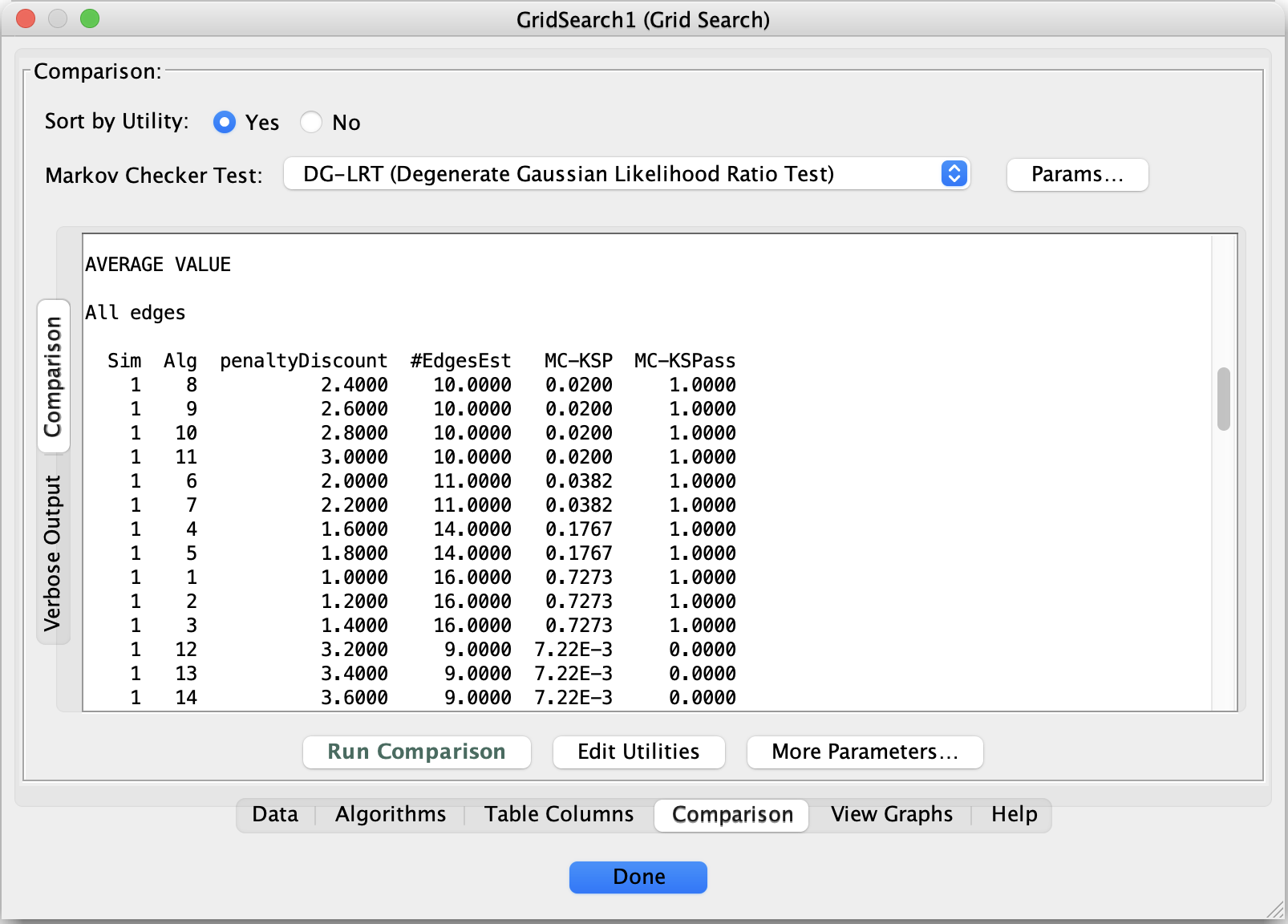
Grid Search comparison results for the Auto MPG data.


6. Interpreting the Comparison Results

In the comparison table, two columns are especially informative:

  • MC-KSPass
    Indicates whether the model passes the Markov check

  • #EdgesEst
    Indicates model complexity

A common pattern is visible:

  • Very sparse models fail Markov checking

  • Very dense models pass but are difficult to interpret

  • Several intermediate models pass Markov checks


Choosing a Model

Among the rows where MC-KSPass = 1, select the model with the fewest edges.

In this example, that corresponds to:

  • Algorithm = 8

This choice represents a minimal Markov-consistent CPDAG under the stated assumptions.
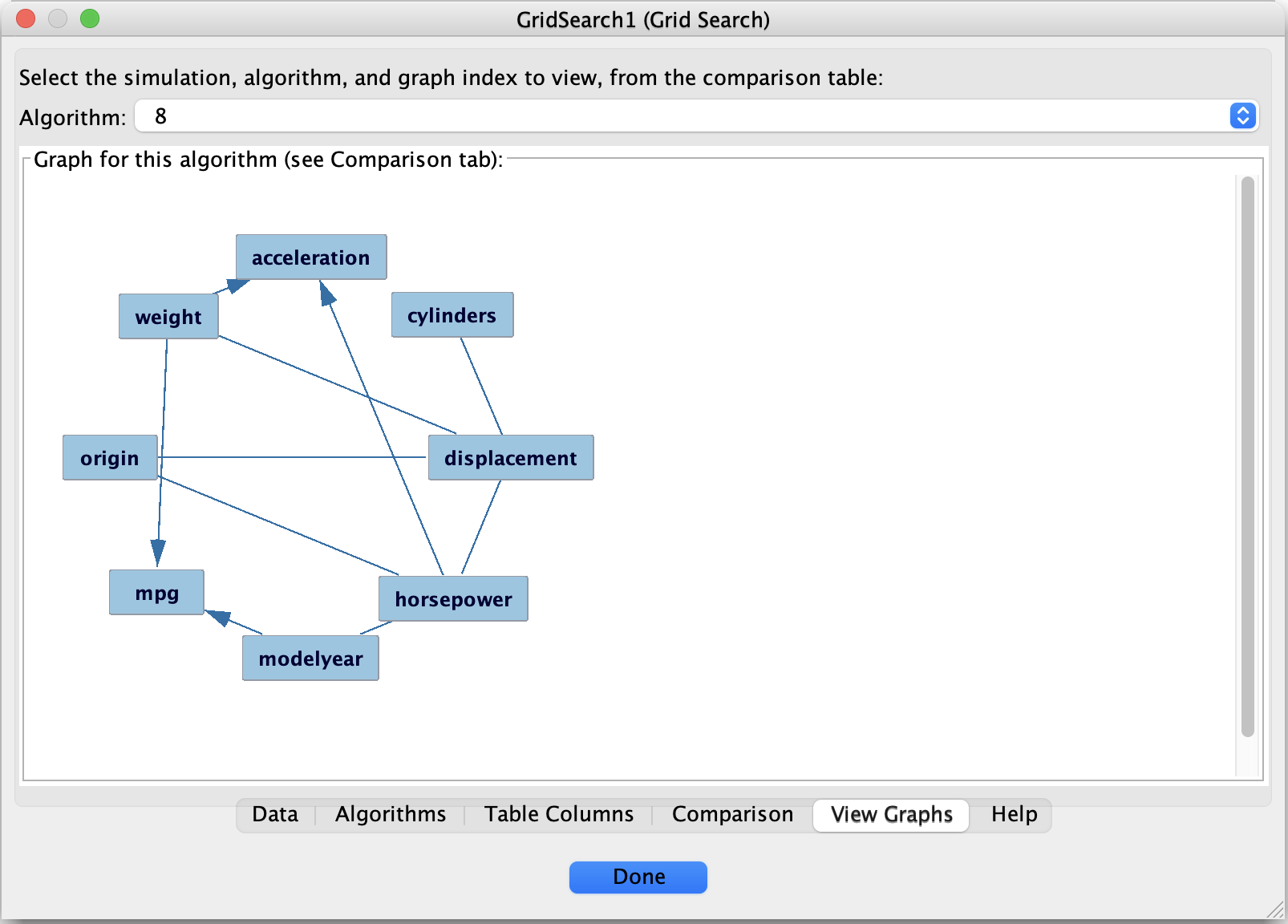
Selected CPDAG for the Auto MPG example.


7. Viewing the Selected Graph

  1. Open the View Graphs tab.

  2. Select Algorithm = 8.

The displayed graph is the final candidate model for this analysis.


8. What This Example Illustrates

This worked example demonstrates a complete default workflow in Tetrad:

  1. Explore the data visually

  2. Make assumptions explicit

  3. Use Grid Search to explore parameter sensitivity

  4. Evaluate models using Markov checking

  5. Select a minimal model that passes diagnostics


9. Next Steps

From here, you might:

  • Explore alternative assumptions (e.g., allowing latent variables)

  • Inspect Markov-check violations in more detail

  • Incorporate background knowledge and rerun the analysis

  • Use the selected structure for causal effect estimation

Previous Next

© Copyright 2025.

Built with Sphinx using a theme provided by Read the Docs.