Running Algorithms
Tetrad’s interface provides a unified way to configure and run many different search algorithms and related procedures (e.g., adjustment, IDA, stability methods). Most of this happens through the Search box in the main workbench.
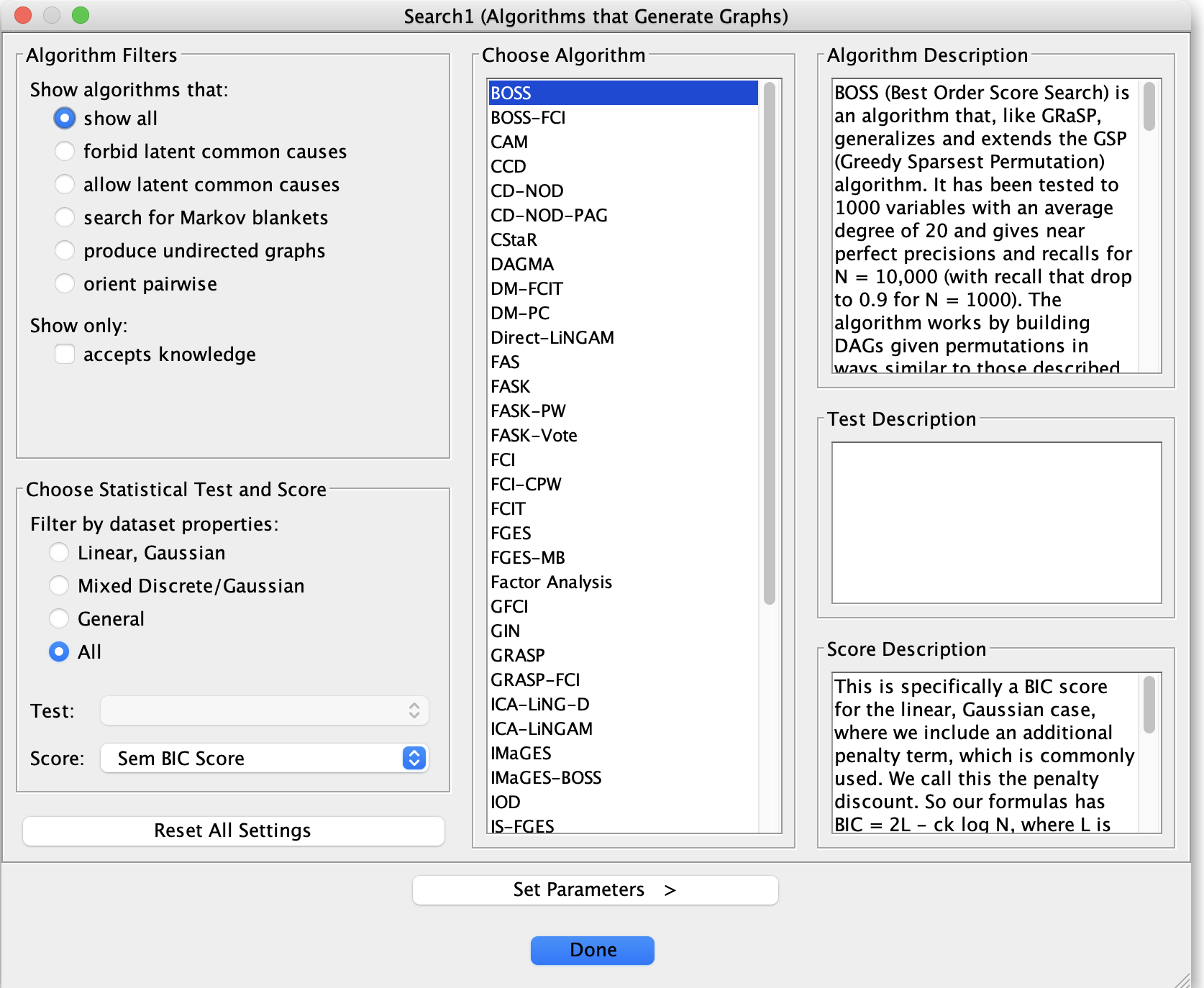
Launching a search
A typical workflow is:
Make sure you have at least one data node in the project tree
(and optionally an initial graph or background knowledge).Place a Search box on the workbench and connect it to:
A Data box (required), and
Optionally a Knowledge box or other inputs, depending on the algorithm.
Double-click the Search node on the workbench.
This opens the algorithm configuration dialog, where you select:The algorithm to run (PC, FGES, GFCI, CStaR, BOSS, etc.).
The data set to use (from the list of loaded data nodes).
A test and/or score (depending on the algorithm).
The graph type to produce (e.g., DAG, CPDAG, PAG), if configurable.
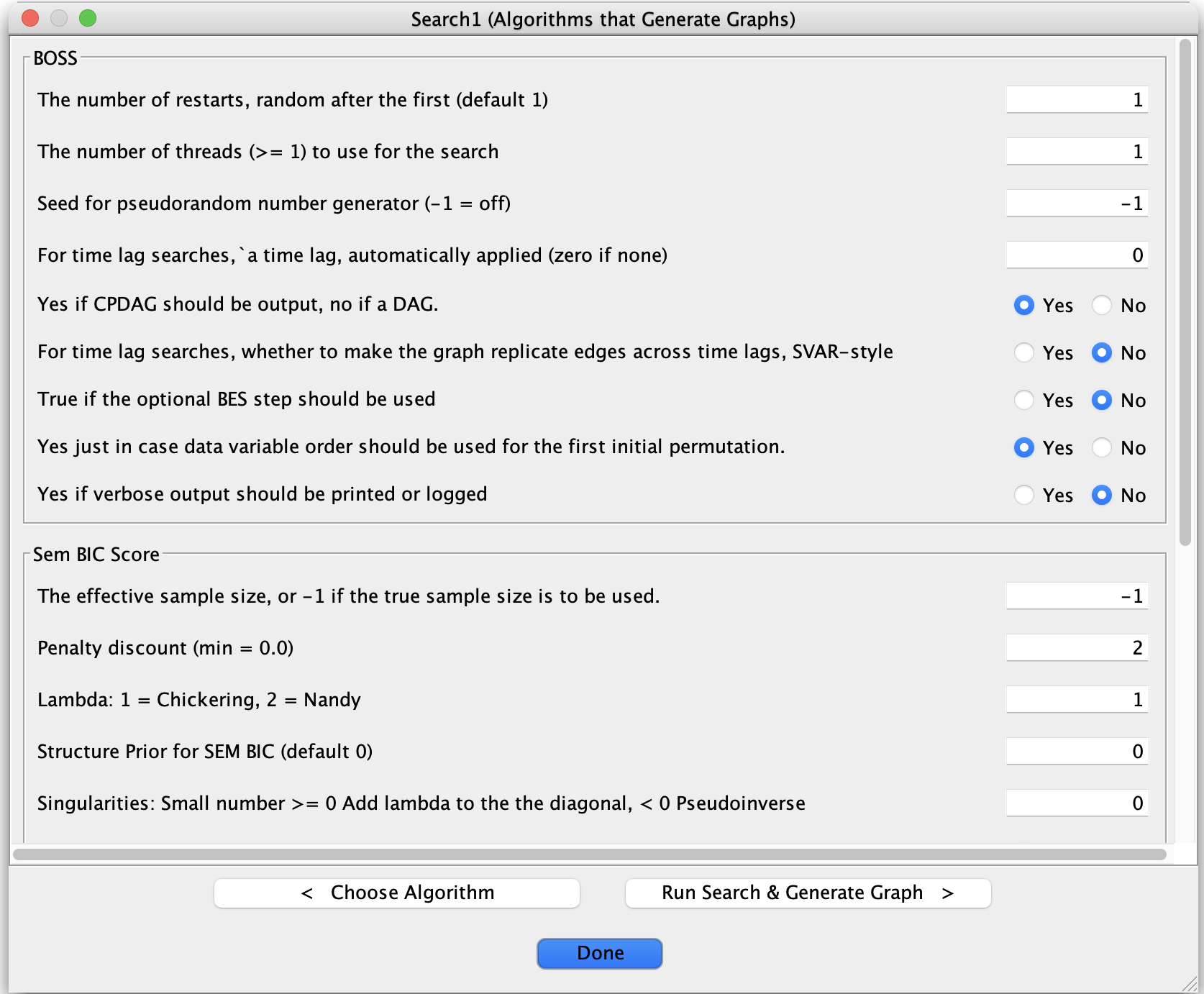
Any algorithm-specific parameters.
When you click Run (or the equivalent button):
Tetrad executes the algorithm.
One or more result graphs (and sometimes tables) are created as new nodes in the project tree.
The primary result graph usually opens automatically in the graph editor.
Choosing tests and scores
The algorithm dialog typically restricts the available tests and scores to those compatible with your data:
For continuous data, choices might include:
FisherZ (independence test),
SemBicScore / Gaussian BIC (score-based methods),
EBIC, basis-function tests/scores, etc.
For discrete data:
GSquare and ChiSquare (independence tests),
DiscreteBicScore or BDeuScore (scores).
For mixed or nonlinear cases:
Conditional Gaussian tests/scores,
Basis-function LRT/BIC,
Kernel-based tests such as Kci, when appropriate.
The dialog lists only those tests and scores that match the data type of the selected data node.
For details on individual tests and scores, see the Tests & Scores section of the manual.
When you run a search, use the state of the Test and Score dropdowns as a guide:
If the Test dropdown is enabled (not greyed out), you should select the test you want to use for the search.
This includes constraint-based searches such as PC and FCI.If the Score dropdown is enabled, you should select the score you want to use.
This includes score-based searches such as FGES or BOSS.If both dropdowns are enabled, you should select one test and one score.
This includes hybrid algorithms such as BOSS-FCI.If both dropdowns are greyed out, then the algorithm does not use a test or a score.
Setting parameters
Each algorithm exposes a set of named parameters (for example, alpha, penaltyDiscount, maxDegree,
or flags for latent variables and selection bias). In the configuration dialog:
Parameters appear in a table or form with:
The parameter name,
Its current value, and
Often a brief description or default.
Values may be:
Integers or real numbers,
Booleans (true/false),
Options from a small set (drop-down menus).
Defaults are chosen to be reasonable for many problems, but you can adjust them for your specific application. The Parameters and Tests & Scores sections of the manual describe these settings in more depth.
Running and monitoring
When you start a run:
The status bar at the bottom of the main window reports that the algorithm is executing.
Some algorithms display a progress indicator or a rough notion of how far they have proceeded.
If Logging → Start Logging is enabled, you will see log messages in the logging pane as the algorithm runs.
When the run completes:
New result nodes (graphs, tables, or summary reports) appear under the corresponding Search branch in the project tree.
The main result graph typically opens immediately in the graph editor so you can inspect it.
Re-running with modified settings
To try different settings:
Double-click the same Search node again to reopen the configuration dialog.
Change:
The test or score,
One or more parameter values (e.g., a different
alpha),Or options such as allowing latent variables or selection bias.
Click Run to produce a new set of results.
This makes it easy to:
Do small parameter sweeps manually,
Compare runs with and without background knowledge,
Or evaluate the effect of changing test/score families for the same data.
For larger grids of parameter combinations, see the Grid Search page in this section.