Latent Structure Box
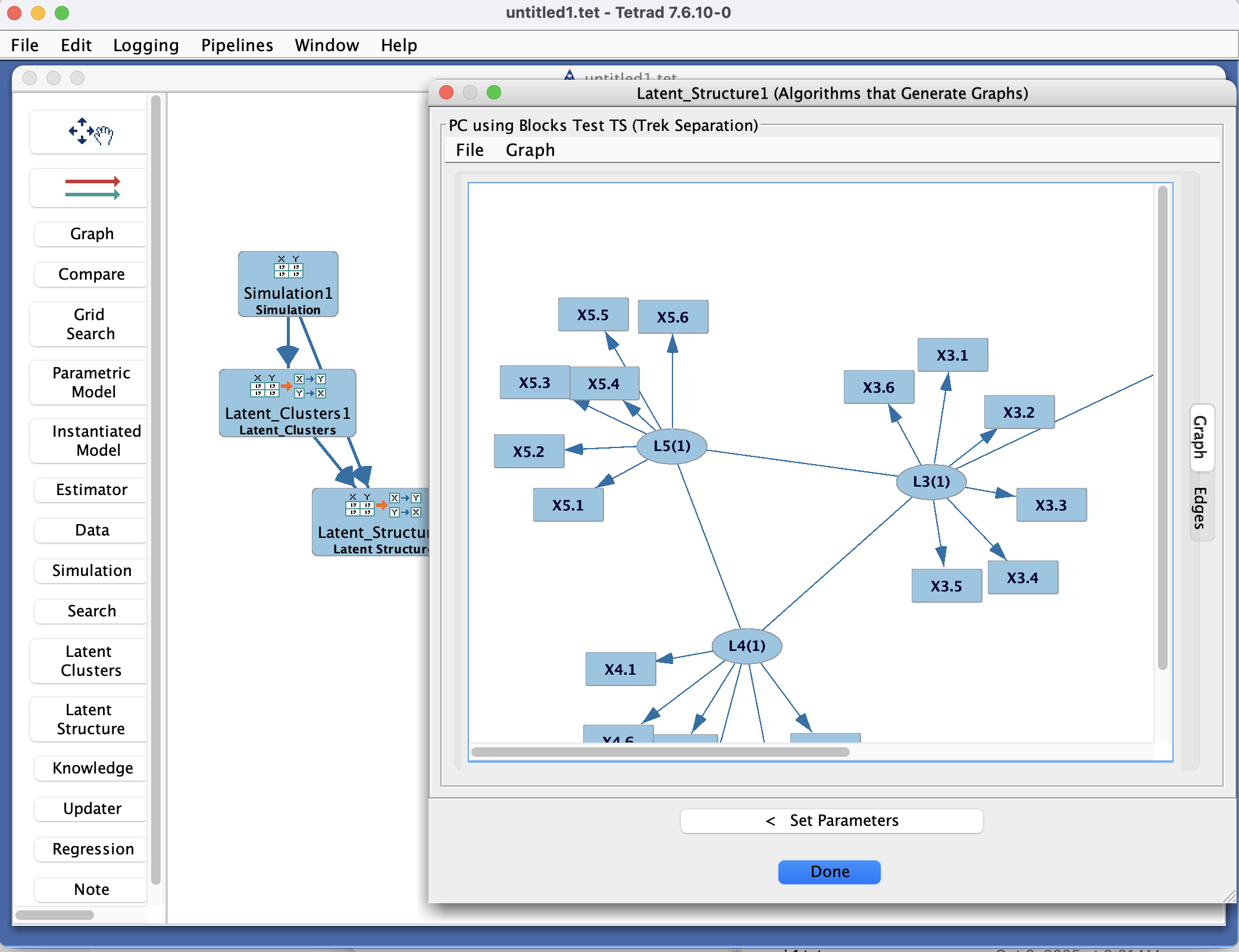
Latent Structure Box in the Tetrad interface sidebar and main panel.
Purpose
The Latent Structure box is where you run latent-structure search algorithms in Tetrad. Its interface is the same wizard used by the Search box, but specialized for latent-variable structure:
It only offers latent-structure search methods (e.g., multiple-indicator models, latent DAGs, and related procedures).
In addition to data and (optionally) background knowledge, it can also take input from a Latent Clusters box, using discovered clusters as candidate latent factors.
The Latent Structure box connects:
one or more datasets (from the Data box),
optional latent clusters (from the Latent Clusters box),
optional background knowledge (from the Knowledge box),
and a choice of latent-structure search algorithm,
and produces one or more latent-variable graphs (with latent nodes and their indicators) that appear in the Graph box.
Typical uses include:
Learning multiple-indicator models (MIMs) or other factor-analytic structures.
Searching for latent DAGs consistent with observed correlations and clusters.
Combining variable clustering with explicit latent-variable modeling.
Wizard workflow
Double-clicking a Latent Structure box opens the same two-card wizard used by the Search box.
Card 1: Choose latent-structure algorithm, test, and score
The first card focuses on selecting an algorithm (restricted to latent-structure search) and, where required, an independence test and/or score.
Algorithm selection
At the top, you choose a latent-structure search algorithm from a combo box (a list selector).
Algorithm filters help narrow the list to methods appropriate for:
Continuous vs. discrete vs. mixed data,
Presence of latent clusters (from a Latent Clusters box),
Desired output (e.g., MIMs vs. more general latent DAGs).
When you highlight an algorithm, a description appears on the right, explaining:
What type of input it expects (data only, or data + latent clusters),
What assumptions it makes about the latent structure,
What kind of output it produces (e.g., latent variables with multiple indicators, latent DAGs over factors).
Latent clusters, tests, and scores
If you have a Latent Clusters box feeding into the Latent Structure box, the wizard can use these clusters as candidate latent factors:
Each cluster may become a latent factor with observed indicators given by the clustered variables.
In the lower-left portion of the card, you choose:
An independence test (for constraint-based latent-structure algorithms) and/or
A score (for score-based latent-structure algorithms), depending on what the selected algorithm requires.
A filter helps you find tests/scores compatible with your data type and the chosen algorithm.
When you select a test or score, its description is also shown on the right for reference.
Once you are satisfied with your algorithm, test, and score choices, click Set Parameters at the bottom of the wizard to move to the second card.
Card 2: Set parameters and run latent-structure search
The second card shows parameters for the chosen latent-structure algorithm, and (if applicable) its test and/or score. Here you can:
Edit algorithm parameters, such as:
Constraints on the number of latent variables or indicators per latent,
Thresholds or penalties for adding/removing latent–indicator edges,
Options for how latent clusters are converted into latent factors.
Edit test parameters, such as:
Significance levels or robustness options for independence tests in the latent setting.
Edit score parameters, such as:
Penalty weights or prior settings used to balance model fit against complexity.
For more detailed explanations of what each parameter means and its allowable range, consult:
The documentation page for the specific latent-structure algorithm, test, or score, or
The global Parameters listing in the manual, which documents all Tetrad parameters.
From this card you can:
Click Choose Algorithm to go back to the first card and pick a different latent-structure algorithm or test/score combination.
Click Run Algorithm to execute the latent-structure search with the current settings.
When you click Run Algorithm, the search is executed and a resulting latent-variable graph is produced and added to the Graph box. The Latent Structure box remembers your configuration so you can re-run or tweak it later.
Connecting data, clusters, knowledge, and outputs
Although the wizard focuses on algorithm/test/score choices and parameters, the Latent Structure box sits in the larger project workflow:
Inputs
Draw an arrow from a Data box into the Latent Structure box to provide the dataset.
(Optional) Draw an arrow from a Latent Clusters box to provide variable clusters that may be turned into latent factors.
(Optional) Draw an arrow from a Knowledge box to impose background constraints on latent and observed edges (for algorithms that support this).
Outputs
When the algorithm finishes, the resulting latent-variable graph is sent to a Graph box.
You may attach multiple Graph boxes if you want to keep different latent-structure runs separate.
You can also duplicate a Latent Structure box on the workbench to explore different latent-structure algorithms, cluster inputs, or parameter settings.
Common patterns & tips
Use the Latent Structure box when you want explicit latent variables rather than treating all variables as fully observed.
A common workflow:
Use Latent Clusters to discover candidate groups of indicators.
Feed those clusters into the Latent Structure box.
Choose a latent-structure search algorithm and tune parameters on the second card.
Inspect the resulting latent graph in the Graph box and refine as needed.
Consider using background knowledge to:
Fix certain variables as indicators of particular latent factors,
Prohibit certain edges between latent variables,
Enforce tiers or ordering among latents.