Detail: Bayes (Multinomial) Instantiated Model
This page describes Bayes (multinomial) instantiated models in the Instantiated Model box. These are discrete Bayesian networks that have been estimated on a dataset, starting from a Bayes parametric model.
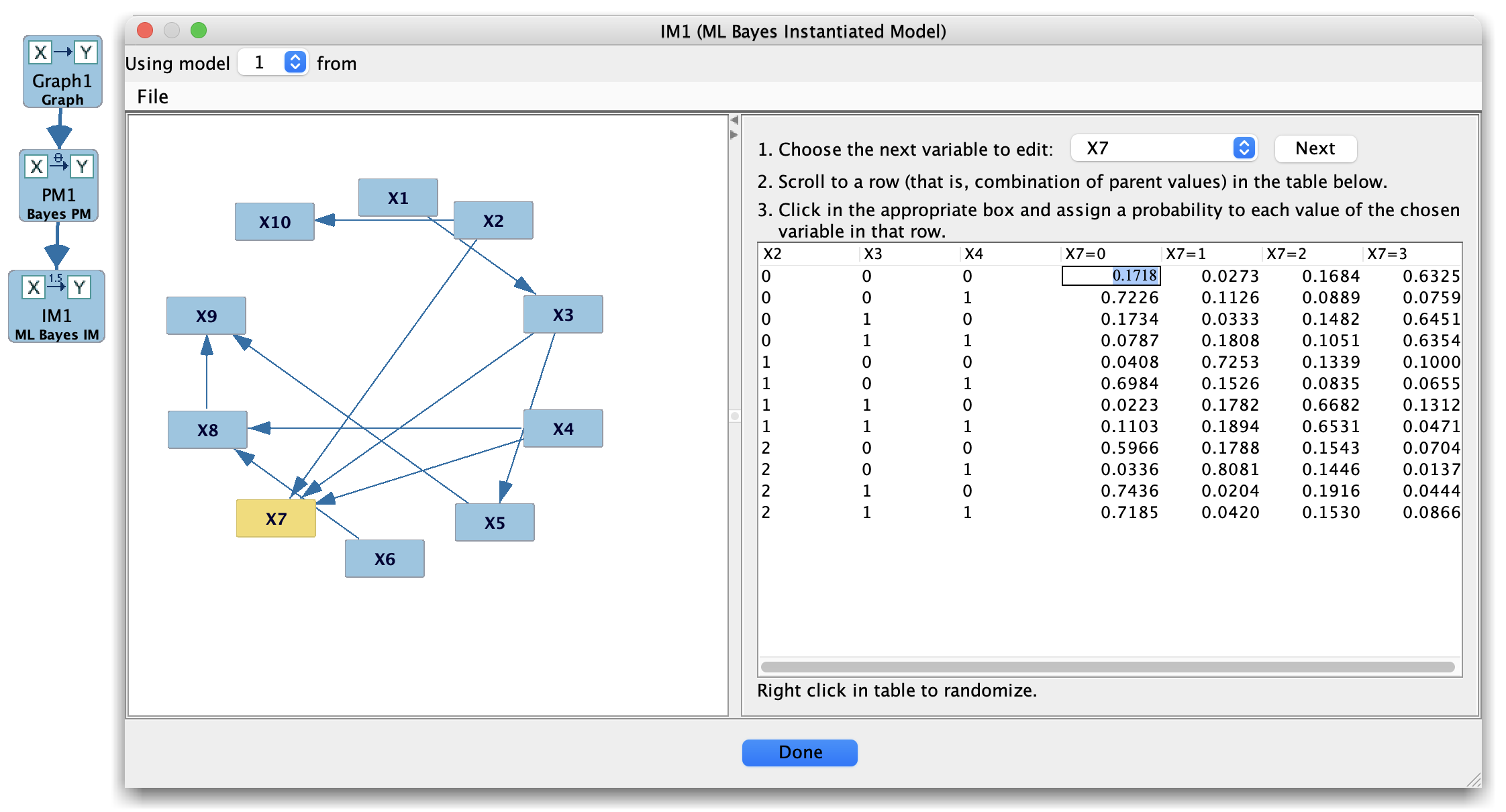
Bayes (Multinomial) Instantiated Model
An instantiated Bayes model consists of:
A graph structure over discrete variables.
A collection of multinomial conditional probability tables (CPTs) with concrete probability values.
Optionally, summary quantities such as the log-likelihood or BIC for a particular dataset.
How Bayes instantiated models are created
In the Parametric Model box, create a Bayes (multinomial) model whose structure and state spaces match your discrete graph and data.
In the Estimator box, select:
The Bayes parametric model, and
A discrete dataset (from the Data box).
Run an appropriate estimator (e.g., maximum likelihood or a Bayesian estimator).
The output is a fitted Bayes model.Save or send this result to the Instantiated Model box, where it appears as a Bayes instantiated model.
Each instantiated model is tied to the dataset and estimator that produced it.
Instantiated Model box layout (Bayes)
When you select a Bayes instantiated model in the Instantiated Model box, the main panel typically shows:
A list of variables with their state spaces.
For each variable:
The parent set.
The estimated CPT for (P(X \mid ext{Parents}(X))), with one row per parent configuration and one column per child state.
Optional summary information, such as:
Log-likelihood or average log-likelihood on the data.
Penalty-based scores (e.g., BIC) if your setup computes them.
The entries in the CPTs are now fixed, estimated probabilities, not free parameters as in the parametric model view.
Typical uses
Bayes instantiated models are useful when you want to:
Inspect fitted CPTs to see how the data support various conditional relationships.
Simulate new discrete datasets from the fitted Bayesian network (via the Simulation box).
Compare multiple fitted Bayes models using the Compare box, for example by BIC or predictive performance.
Tips
Make sure the state labels and ordering in the data and parametric model agree; otherwise estimation can silently misalign probabilities.
If you fit the same Bayes parametric model to multiple datasets, keep each instantiated model separate and use descriptive names indicating the dataset and estimator.