Instantiated Model Box
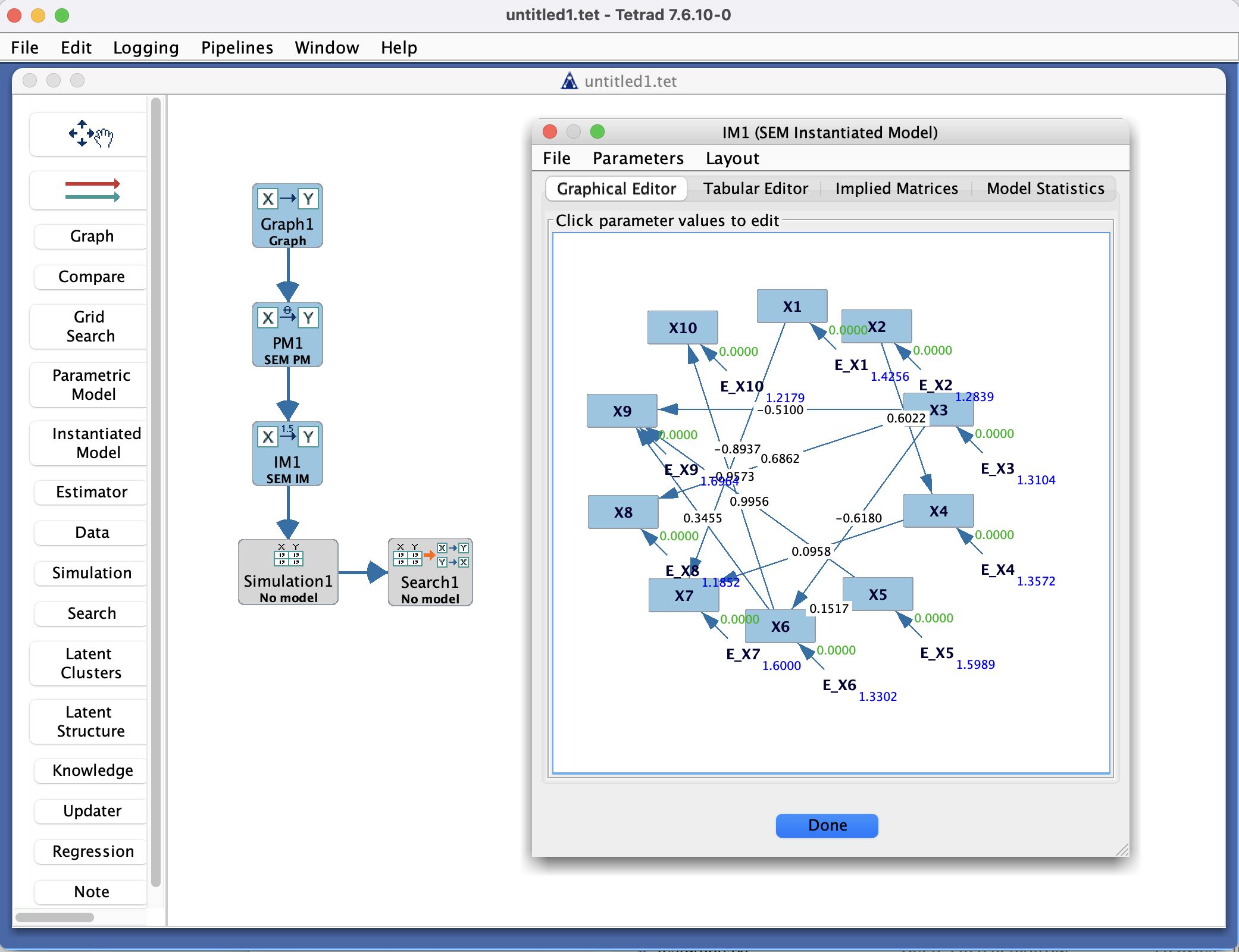
Instantiated Model Box in the Tetrad interface sidebar and main panel.
Purpose
The Instantiated Model box is where you work with models that have been tied to data and (typically) estimated. Conceptually, an instantiated model is:
a parametric model specification (from the Parametric Model box),
plus a dataset (from the Data box),
plus a particular set of parameter values (usually obtained via the Estimator box).
You use this box to:
Store fitted models as concrete objects in the project.
Inspect fit statistics and parameter estimates.
Pass fitted models on to other tools (e.g., simulation, comparison, or effect estimation).
Model families
Every instantiated model belongs to one of the same four model families as parametric models:
Bayes (multinomial) – discrete Bayesian networks with multinomial CPTs.
SEM (linear SEM) – linear Gaussian structural equation models.
Hybrid (conditional Gaussian) – mixed discrete/continuous conditional Gaussian models.
Generalized – user-specified functional forms and error distributions.
Each instantiated model assumes that you have already created a matching parametric model of the same family and then estimated it on a dataset. The interface in the Instantiated Model box differs slightly for each family (for example, CPTs for Bayes models versus path coefficients and fit indices for SEMs). These differences are explained in the corresponding detail callouts:
Detail: Bayes (Multinomial) Parametric & Instantiated ModelsDetail: SEM (Linear) Parametric & Instantiated ModelsDetail: Hybrid (Conditional Gaussian) Parametric & Instantiated ModelsDetail: Generalized Parametric & Instantiated Models
Typical workflow
Build a parametric model
In the Parametric Model box, create a model whose structure matches your intended graph or SEM.
Choose one of the four families (Bayes, SEM, Hybrid, or Generalized).
Make sure variable names and types match those in your dataset.
Estimate the model
In the Estimator box, select:
The parametric model, and
A dataset.
Run the estimator to obtain parameter estimates and (when available) fit statistics.
The estimator produces a fitted result of the same family as the parametric model.
Create an instantiated model
The result of estimation can be stored as an instantiated model.
In many workflows, this happens automatically when you choose to keep or save the fitted result; in others, you may explicitly send the estimator output to an Instantiated Model box.
Each instantiated model remembers:
Which parametric model it came from,
Which dataset was used,
Which estimator and settings were used.
Inspect and reuse
In the Instantiated Model box:
Select a model to see parameter estimates, standard errors (if available), and fit indices.
The exact layout depends on the family (Bayes/SEM/Hybrid/Generalized).
Use the instantiated model as input to:
Simulation (to generate synthetic data from the fitted model),
Compare (to compare fits across models),
Or other tools that require fully specified, data-tied models.
Key controls
Toolbar
Rename / Duplicate / Delete – manage instantiated models.
Export – save a fitted model (and possibly its estimates) to a file, when supported.
Instantiated model list
Shows all instantiated models currently stored in the project.
Each entry corresponds to a particular combination of:
Parametric model,
Dataset,
Estimation method and settings,
Model family (Bayes, SEM, Hybrid, or Generalized).
Main panel
Displays details of the selected instantiated model, such as:
Parameter estimates and (optionally) standard errors.
Overall fit measures (e.g., χ², RMSEA, CFI, BIC) for SEM-type models.
Log-likelihood or other summary scores for Bayes/Hybrid/Generalized models, when available.
The exact tables and diagnostics shown depend on the model family and estimator.
Common patterns & tips
Use descriptive names that encode:
The parametric model name,
The dataset,
The estimator,
And (optionally) the model family and key settings.
Keep both the parametric model and the instantiated model when doing model comparison:
The parametric model describes the form you want to test.
The instantiated model stores what happened for a particular dataset and estimator.
If you re-estimate the same parametric model on different datasets (e.g., cross-validation folds or different populations), keep separate instantiated models for each case.
Remember that each instantiated model type (Bayes, SEM, Hybrid, Generalized) inherits its interpretation and limitations from the corresponding parametric model family; see the detail callout pages for family-specific guidance.